Snakemake in neuroimaging: a worked example
This is a detailed worked example of how the workflow manager Snakemake can be used to specify and execute workflows for processing and analysing neuroimaging data.
The accompanying manuscript, Orchestrating neuroimaging data processing using the ‘Snakemake’ workflow manager, describes the motivation and advantages for using Snakemake and provides a conceptual overview of its operation. We recommend reading the manuscript prior to working through this tutorial. In the manuscript, we describe a simple example workflow that processes publicly-available data from an fMRI study by Poldrack et al. (2016).
In this website, we extend this example by:
Providing stepwise instructions that demonstrates how a workflow can be built incrementally.
Adding additional workflow stages that highlight the flexibility and capacity of Snakemake as a comprehensive workflow manager.
We will be working through the implementation of the below workflow:
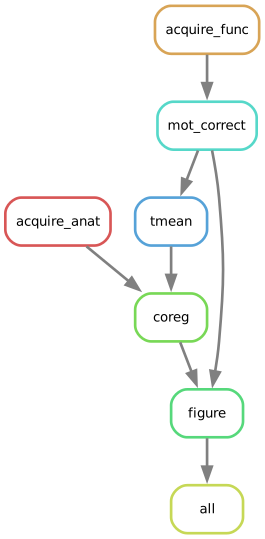
Please report any issues or raise any questions via email or the issue tracker in the repository.
If you find this useful, please consider letting us know via email and by citing the accompanying paper:
Mannion, D.J., Quiroga, M., Paul, J.M., & Garrido, M.I. (2026) Orchestrating neuroimaging data processing using the ‘Snakemake’ workflow manager. Brain Structure and Function, 231(131), 1–14. https://doi.org/10.1007/s00429-026-03189-3
Contents
- Preparation
Describes the steps required to set up the necessary software and initialise the project.
- Configuration
Prepares configuration details for the example analysis.
- Data acquisition
Implements an initial workflow step that downloads the raw data from the example dataset.
- Motion correct
Implements a ‘motion correction’ step in the pre-processing of fMRI BOLD images.
- Temporal averaging
Implements a ‘temporal averaging’ step to summarise fMRI BOLD images.
- Coregistration
Coregisters the anatomical and functional images.
- Visualisation
Produces an example visualisation of the processed data.
- Wrap-up
Finalises and visualises the workflow and provides suggestions for next steps.