Wrap-up
In this worked example, we have used Snakemake to construct and implement a reproducible and transparent workflow for a data analysis.
Running the workflow from scratch
We have followed an incremental approach in which we implemented each workflow step in turn — gradually building up the complete workflow, with the opportunity to examine the construction and operation of each successive rule in relative isolation. After following this sort of strategy, a useful final step is to re-create all the output from scratch. Thankfully, this is what specifying the workflow in Snakemake makes easy!
One option is to run Snakemake with the --forceall argument, which ignores any existing output from the rules.
However, we recommend just running Snakemake with a clear results directory — just in case there are any unexpected dependencies on files existing in results outside of the workflow.
For example:
$ mv results results_backup
$ mkdir results
$ uv run snakemake
A good additional check is to look for any lines that begin with results/ in the output of the command:
$ uv run snakemake --list-untracked
These lines show files that are present in results but are not associated with the Snakemake workflow.
Visualising the workflow
It is useful to be able to visualise the flow of files between rules in the workflow.
This can be achieved by using the --rulegraph argument to snakemake, which produces output in Graphviz format.
This output can then be passed to the dot application (see Graphviz for installation instructions) and rendered as a file such as a PNG or SVG:
$ uv run snakemake --rulegraph | dot -Tsvg -o rulegraph.svg
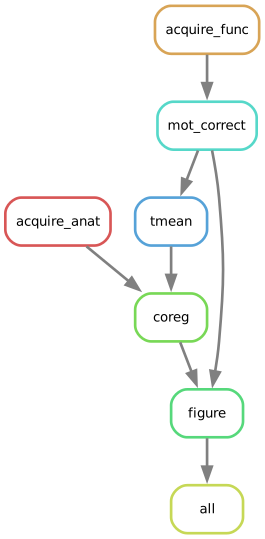
There is also the --dag option, similar to the above — however, it can produce crowded output and tends to be less useful than the rulegraph for realistic workflows.
However, it does produce a nice visualisation here:
$ uv run snakemake --dag | dot -Tsvg -o dag.svg
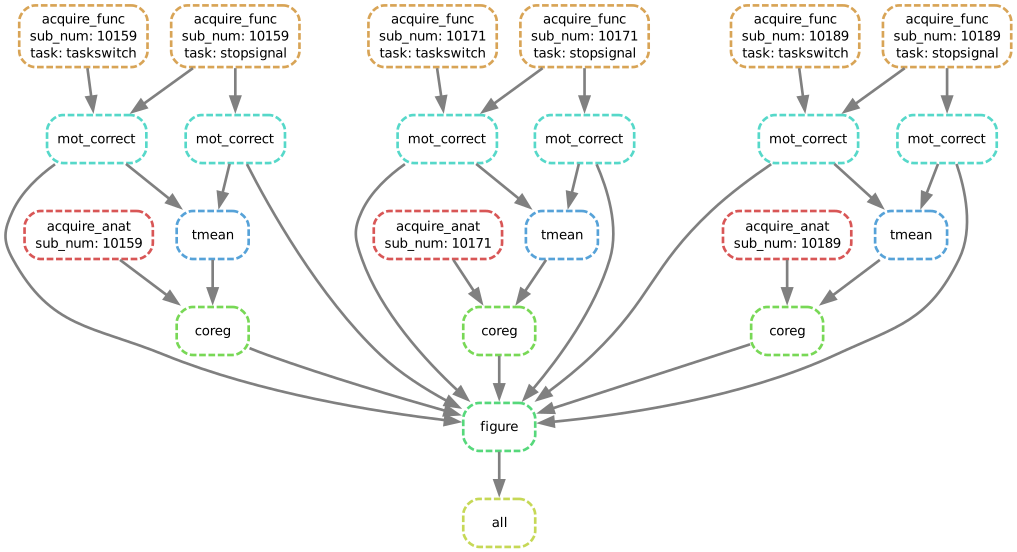
These visualisations are a great way of debugging and validating the connectivity between rules.
Potential next steps
That concludes this worked example. However, you may now like to start experimenting with the workflow. A few ideas you might like to investigate are:
Try changing the shell command or script associated with a rule and then run Snakemake with the
--dry-runargument. Which jobs do and don’t require re-execution after the change?Maybe you would like to use a different software package to run the motion correction. Try altering the rule to use software like FSL or SPM instead of AFNI.
Try doing an analysis of the task data, such as running a GLM for each participant.
Try using R instead of Python for the visualisation.